Nolt vs Canny: Which Feedback Tool Fits Your Team?
Compare Nolt and Canny on feedback collection, moderation, roadmaps, integrations and pricing to find the right fit for your SaaS team.
If you're choosing between Nolt and Canny, the main question is how much you need your feedback tool to do. Both give customers a place to share requests, and both connect feedback to a public roadmap and changelog. But they take different approaches.
Canny is the deeper tool. Its AI can pull requests from support conversations and other sources, then find and merge duplicates. It also offers company-level vote grouping and, on higher plans, CRM data. The trade-off is that its price depends on how many people interact with your feedback.
Nolt is the simpler option. Every plan includes unlimited users, content and admins, while the plan you need depends on how many boards you run. It also has a moderation queue and lets customers contribute without revealing who they are.
The right choice depends on how your team collects feedback, how much control you need, and how you expect the product to grow.
Features: how the tools compare
Collecting feedback
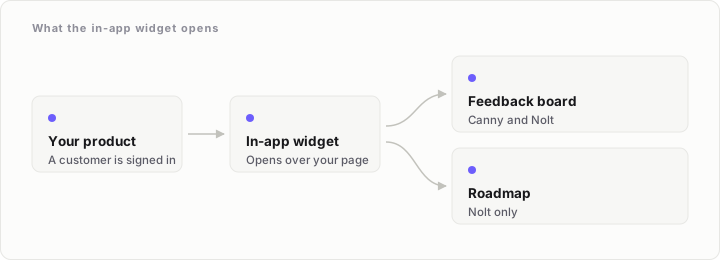
Both tools provide a board for customer requests and a way to bring feedback into your product. Canny's widget embeds a board in a web or mobile app on every plan. Nolt offers a modal, iframe or button, and its modal can show either a board or a roadmap.
The biggest difference is whether customers must identify themselves. Canny does not support fully anonymous feedback: people need to provide a name and email before posting, voting or commenting. Nolt has an "Allow anonymous actions" setting, so customers can take part without revealing who they are.
Both can sign customers in through your own product. Canny Identify or SSO is available on every plan. Nolt offers JWT single sign-on on every plan, with custom user attributes on Pro.
That means you do not have to choose between the tools based on sign-in alone. Think instead about whether you want customers to participate anonymously, and whether the widget needs to show a roadmap as well as a board.
Moderation and duplicate requests
If you want to review new posts before customers can see them, Nolt has the clearer option. New posts and comments can wait in a moderation queue until someone approves them.
Canny does not offer a moderation queue. You can switch off new posts, and likely spam is hidden until approved, but that is not the same as reviewing every new post before it appears.
Both tools help with duplicate requests, but in different ways. Canny's AI merges duplicates on every plan. Nolt suggests similar posts while someone is writing a new one, and a merge moves the votes to the existing post.
Choose based on the work you want to do. Nolt gives moderators a review step before publication. Canny uses AI to help keep overlapping requests together, including duplicates found in conversations.
Organising and prioritising requests
Nolt includes unlimited custom statuses and custom fields on every plan. Its fields can be select, multi-select, text or checklist, and it also supports internal notes. This gives a small team room to organise requests without moving to a higher plan just to add fields or statuses.
Canny has custom statuses and custom fields on Pro, along with scoring and formula fields. It also groups votes by company. User segmentation is available on Pro, while revenue data from HubSpot or Salesforce is available on Business.
Nolt lets you filter posts using internal user attributes such as plan, company size and role. However, grouping votes by company is still a planned request on Nolt's board.
For a founder or product manager who wants to sort requests by customer type, Nolt's filters may be enough. If you need to see how many votes come from each company, or connect feedback to CRM revenue, Canny has the more developed set of tools.
Canny also has a different kind of AI feature: it can read closed conversations from tools including Intercom, Zendesk, Help Scout, Freshdesk, Slack, Gong and Zoom, pull out feature requests and merge duplicates. This is available on every plan with no usage cap. Nolt does not describe an equivalent conversation-capture feature, although its AI can draft changelog entries from posts or GitHub commits.
Roadmaps and changelogs
Both products offer a public roadmap on every plan. In Canny, choosing the roadmap's columns requires Pro, and the roadmap shows exactly three columns. In Nolt, a post joins the roadmap when you give it a status, and completed posts are grouped by month.
Their changelogs also cover the basics, but the details differ. Both have a changelog, and Canny's is on every plan. Canny requires Pro to email changelog updates to subscribers. Nolt offers scheduling, an in-app widget and email announcements.
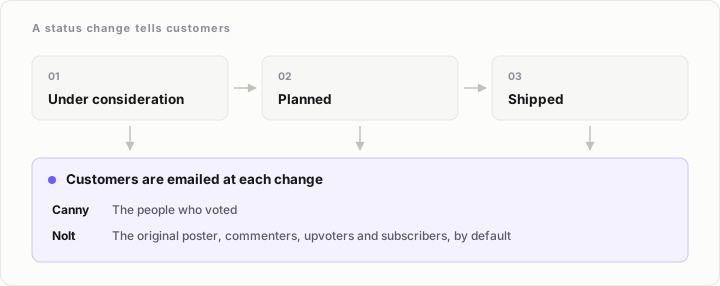
Both tools can notify customers when a request changes status. Canny emails voters when a post's status changes. Nolt emails the original poster, commenters, upvoters and subscribers by default.
If you want to connect a status change with a customer update, either tool can do that. Check the specific notification and publishing options against the way your team communicates; the details are not identical.
Integrations and data
Canny Pro supports Jira, Linear, ClickUp, Asana and GitHub, with two-way status sync. HubSpot and Salesforce integrations are available on Business. Nolt supports GitHub and Trello on Essential, then adds Jira, Linear, Asana and monday.com on Pro. Nolt does not list a CRM integration.
If your team wants feedback to stay in sync with development work, compare the specific tracker you use and the plan required. If sales or customer success needs to connect requests with CRM revenue, Canny has an option for that on Business.
Branding, access and data location
Canny supports private and custom-access boards, with custom access on Pro. Nolt supports private boards on every plan; password protection and email-domain restrictions are available on Pro.
For larger organisations, their enterprise sign-in options differ. Canny Business supports Okta, OIDC, Entra ID and OneLogin. Nolt Enterprise supports SAML 2.0, OpenID Connect and SCIM.
Language support works differently, too. Canny Pro machine-translates content into each viewer's language, although Canny's own interface is English-only. Each Nolt board runs in one of more than 20 languages.
Neither product documents custom CSS as an available feature. Nolt has an open request for it, while no custom CSS option is documented for Canny.
Data location may settle the choice for some teams. Canny stores all data in the United States. Nolt has a separate EU-hosted instance, with data isolated in the EU and pricing in euros.
What each product's users are asking for
Both companies run public feedback boards for their own products. Looking at the open requests near the top of each board reveals some useful gaps. The ranks below are each request's position among open requests on its own board; the boards differ in size, so their vote totals should not be compared directly.
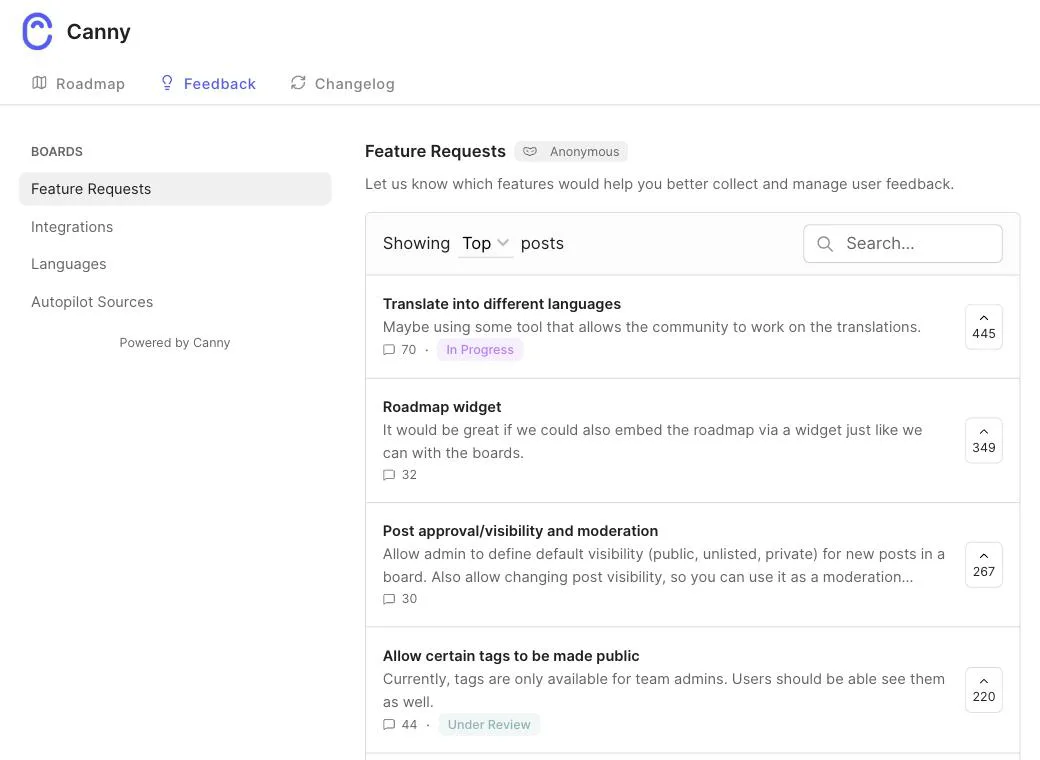
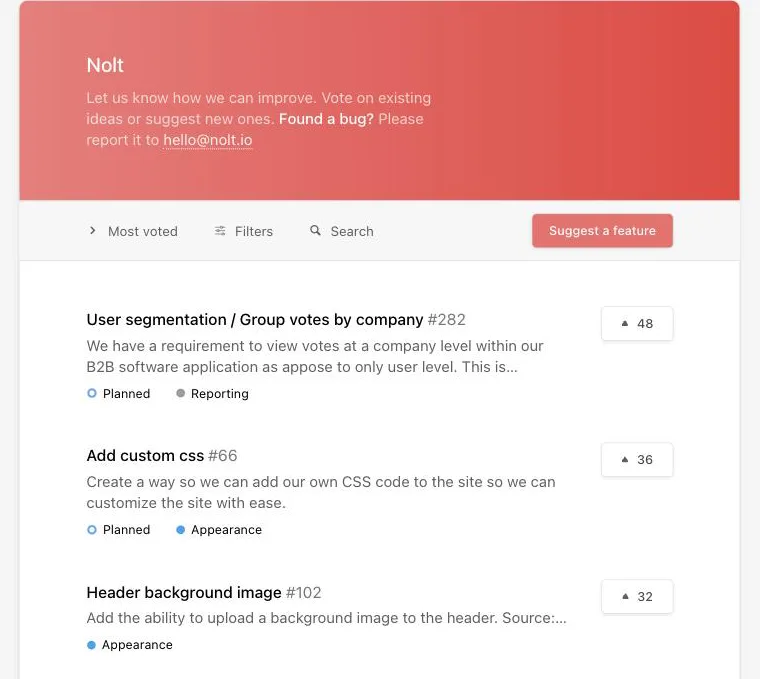
On Canny's board, a roadmap widget is the second-ranked open request, and post approval and moderation ranks third. Nolt already has both: its widget can show a roadmap, and its moderation queue holds new posts and comments for approval.
Other open requests on Canny's board include allowing posts without registration, downvoting and pinned posts. Nolt supports anonymous actions, has a downvote setting, and can pin a post to the top of the board. Those are examples of requests on Canny's board that the competing product already offers.
There are also two requests neither product has fully addressed. Limiting how many votes a person can cast is an open request on both boards, ranked sixth on each. Custom CSS in the web widget is also open on both boards; it ranks eighteenth on Canny's board and is a planned request ranked second on Nolt's.
Nolt's top open request is user segmentation or grouping votes by company. It is marked planned on Nolt, while Canny has shipped company-level vote grouping. Nolt users are also asking for a Zendesk integration and the ability to post to Nolt from Slack. The Zendesk request is in progress; the Slack request is planned. Canny already reads Zendesk and Slack conversations to capture feedback.
The pattern is worth noticing: each tool has features that users of the other are asking for. Neither is complete in every area, and the public boards make it easier to see what might matter to your team before you commit.
Pricing: what will you pay?
The two products bill in different ways. Canny charges by tracked users: anyone with a post, vote or comment attributed to them counts, including activity added by an admin or Canny's AI. People who never interact are not counted. Nolt charges by plan and board count, with unlimited users, content and admins on every plan.
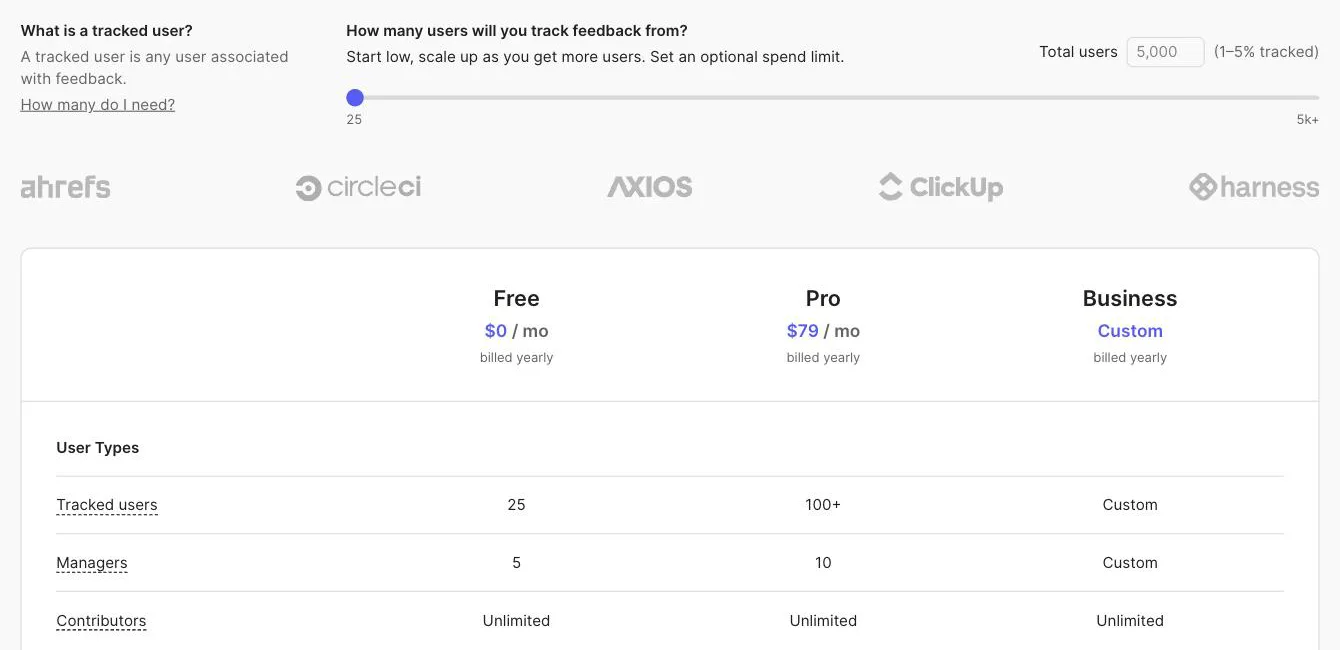
Canny Free costs $0 and includes 25 tracked users, five manager seats and unlimited contributor seats. It has no time limit. Canny Pro starts at $79 per month when billed yearly at 100 tracked users ($948 per year), or $99 month to month. The yearly-billed monthly price rises to $129 at 200 tracked users, $279 at 500 and $529 at 1,000. Pro includes ten manager seats, with unlimited contributor seats. Business starts at 5,000 tracked users and has custom pricing.
When the tracked-user limit is passed, Canny automatically moves the bill up a step unless you set a spending limit. If you set one, feedback from new users stops being tracked. Canny estimates that 1–5% of a B2B SaaS company's users become tracked users, but your own activity will determine the bill.
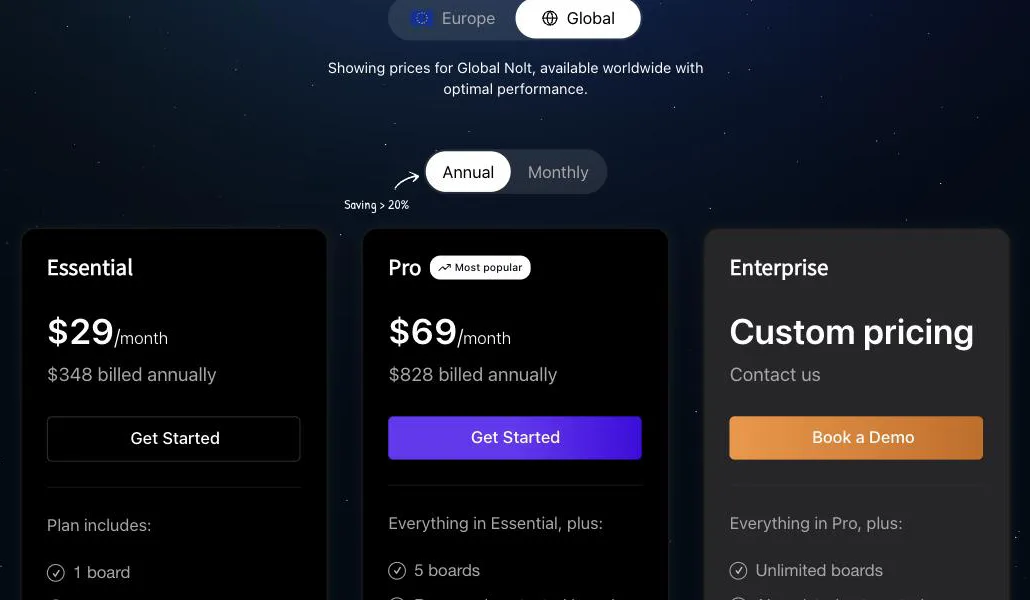
Nolt has no free plan. Essential costs $29 per month when billed yearly ($348 per year) or $39 month to month, and includes one board. Pro costs $69 per month when billed yearly ($828 per year) or $89 month to month, and includes five boards. Enterprise offers unlimited boards at a custom price. Nolt also has an EU-hosted instance priced in euros: Essential is €39 per month yearly or €49 month to month; Pro is €79 yearly or €99 month to month.
Use the calculator above to compare the plans that fit your needs. At the smallest scale, Canny Free costs less than any Nolt plan if you stay within its 25 tracked users. Nolt Pro is $10 per month cheaper than Canny's lowest paid price, whether you pay yearly or month to month. But the total depends on what you need: Canny's bill can rise with engaged customers, while Nolt's plan depends on the number of boards.
Choose Nolt if...
- You want unlimited users and admins without a per-user bill.
- You need to approve new posts and comments before they appear.
- You want anonymous feedback.
- One or five boards are enough for your team, depending on the plan.
- You want to filter feedback by internal user attributes and use custom statuses and fields on every plan.
- You need an EU-hosted option with data isolated in the EU.
Choose Canny if...
- You want AI to find requests in support and other conversations, and merge duplicates.
- Grouping votes by company is important.
- You want to connect feedback to HubSpot or Salesforce revenue on Business.
- Your team needs the supported issue-tracker integrations and two-way status sync on Pro.
- You want to start with a free plan and can work within 25 tracked users.
- You need machine-translated feedback content on Pro.
Neither is the right choice for every team. Canny offers deeper feedback capture and customer-level prioritisation, but its price grows with tracked users. Nolt keeps billing tied to board count and includes a broad set of organising and moderation features on every plan.
Where nolby fits
nolby is another option for teams that want to keep customer feedback, a public roadmap and a changelog together. Its Free plan includes one board, one seat, unlimited voters, a roadmap and a changelog. Pro costs $39 per month and includes unlimited boards, seats and voters, plus a custom domain. Nothing on a nolby plan is counted per voter or per user, and each board can allow people to post without an account.
Questions people ask
Is Nolt cheaper than Canny?
It depends on how you use them. Canny Free costs nothing for up to 25 tracked users, so it is cheaper than any Nolt plan at that level. Nolt Pro is $10 per month cheaper than Canny's lowest paid price. But Canny charges by tracked users, while Nolt charges by board count, so the best-value option depends on your needs.
Does Nolt have a free plan?
No. Nolt does not have a free plan, but a new board gets a 10-day trial of Pro without a credit card. After that, the paid plans depend on how many boards you need: Essential includes one board, Pro includes five, and Enterprise offers unlimited boards at a custom price.
Does Nolt have a changelog?
Yes. Nolt includes a changelog with scheduling, an in-app widget and email announcements. It can also send status-change emails to the original poster, commenters, upvoters and subscribers by default. Canny also has a changelog on every plan, but emailing changelog updates to subscribers requires Pro.
Can customers leave feedback without an account?
Nolt can allow anonymous actions, so customers can vote and contribute without revealing who they are. Canny does not support fully anonymous feedback: a name and email are required before someone can post, vote or comment. If anonymous participation is important to your customers, that difference is worth considering early.
Can I approve posts before they appear?
Nolt has a moderation queue where new posts and comments wait for a moderator's approval. Canny does not offer a moderation queue. You can switch off new posts, and likely spam is hidden until approved, but that is not the same as reviewing each new post before it goes public.
Which is better for single sign-on?
Both support signing customers in through your own product on every plan: Canny offers Identify or SSO, and Nolt offers JWT single sign-on. For enterprise identity, Canny Business supports Okta, OIDC, Entra ID and OneLogin. Nolt Enterprise supports SAML 2.0, OpenID Connect and SCIM. The better fit depends on your identity requirements and plan.