SaaS Public Roadmap Examples: 8 Roadmaps to Learn From
Eight live SaaS public roadmaps and what each one does — how many columns to use, whether to show dates, and whether to show customer votes.
What is a public product roadmap?
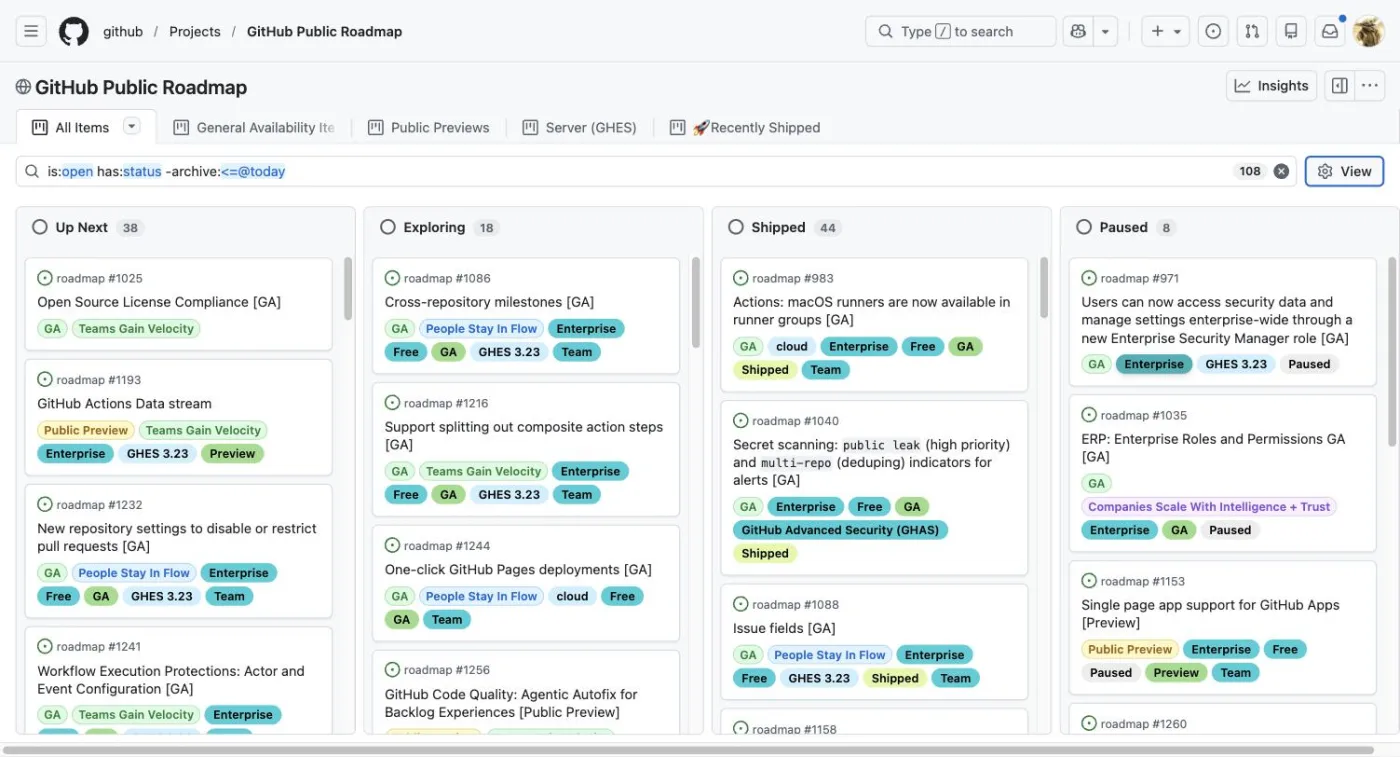
A public product roadmap is a customer-facing view of the product work a company is considering, planning, developing or has released.
Instead of keeping your product direction entirely inside your project-management software, you give customers a window into what you're working on.
A roadmap might show:
- Features you're considering
- Features you have committed to building
- Work currently in progress
- Recently completed features
- Expected release periods
- Customer votes and comments
- Product areas or modules
The exact combination is up to you.
A public roadmap does not need to expose your entire product-development process. In fact, the examples below show that most companies keep the public version relatively simple.
Why publish a public roadmap?
For a SaaS company, the roadmap gives customers somewhere to see where the product is going.
Without one, product requests and product updates can become disconnected.
A customer asks for a feature. The team discusses it internally. Perhaps it gets added to a development backlog. Months later, it may or may not get built.
From the customer's perspective, there is little visibility into what happened.
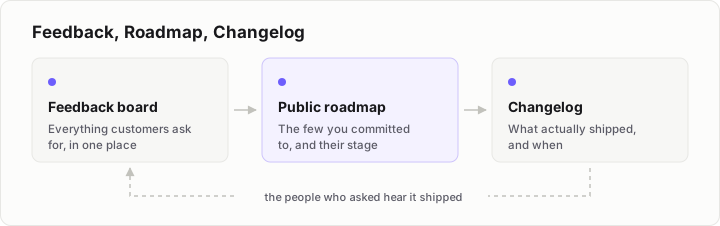
A public roadmap provides a shared view.
A customer can see that a request is being considered, planned or developed. Once it ships, it can move into the completed section and eventually become part of the product's changelog.
That makes the roadmap useful for more than simply announcing upcoming features.
It can become part of the feedback loop between a SaaS company and its customers.
What makes a good SaaS public roadmap?
There is no single template that every company follows.
The examples below use different combinations of statuses, dates, product areas and customer feedback.
But they have one thing in common: the roadmap is understandable without requiring the customer to understand how the company works internally. That is the thread running through everything in our guide to public roadmaps.
That's particularly important for a small SaaS.
You might have detailed internal statuses for design, engineering, QA, review, deployment and release. Your customers probably don't need to see all of those.
A public roadmap can reduce that complexity to a few meaningful stages.
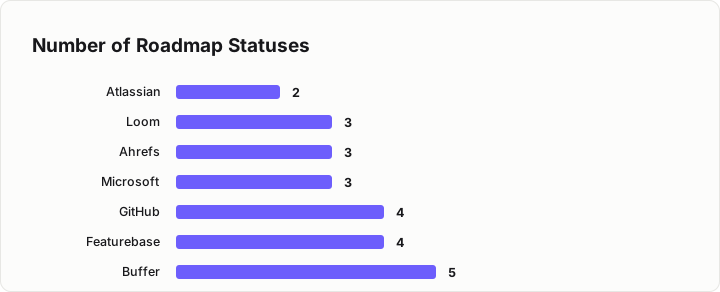
Across the eight roadmap examples we discuss in this article, most of them use only 3-4 roadmap statuses, highlighting the importance of simplicity.
With that in mind, let's look at how some well-known SaaS companies and software products structure their public roadmaps.
8 SaaS Public Roadmap Examples
1. GitHub
GitHub's public roadmap is built directly inside GitHub Projects.
Rather than presenting a simple list of upcoming features, its roadmap cards carry additional information. Cards include a release stage such as GA or Public Preview, the plan tiers they apply to, and a strategic theme.
Saved views also split the roadmap into areas such as GA items, previews, server releases and recently shipped work.
The roadmap contains 38 items in Up Next, 44 in Shipped, and 108 open items in total.
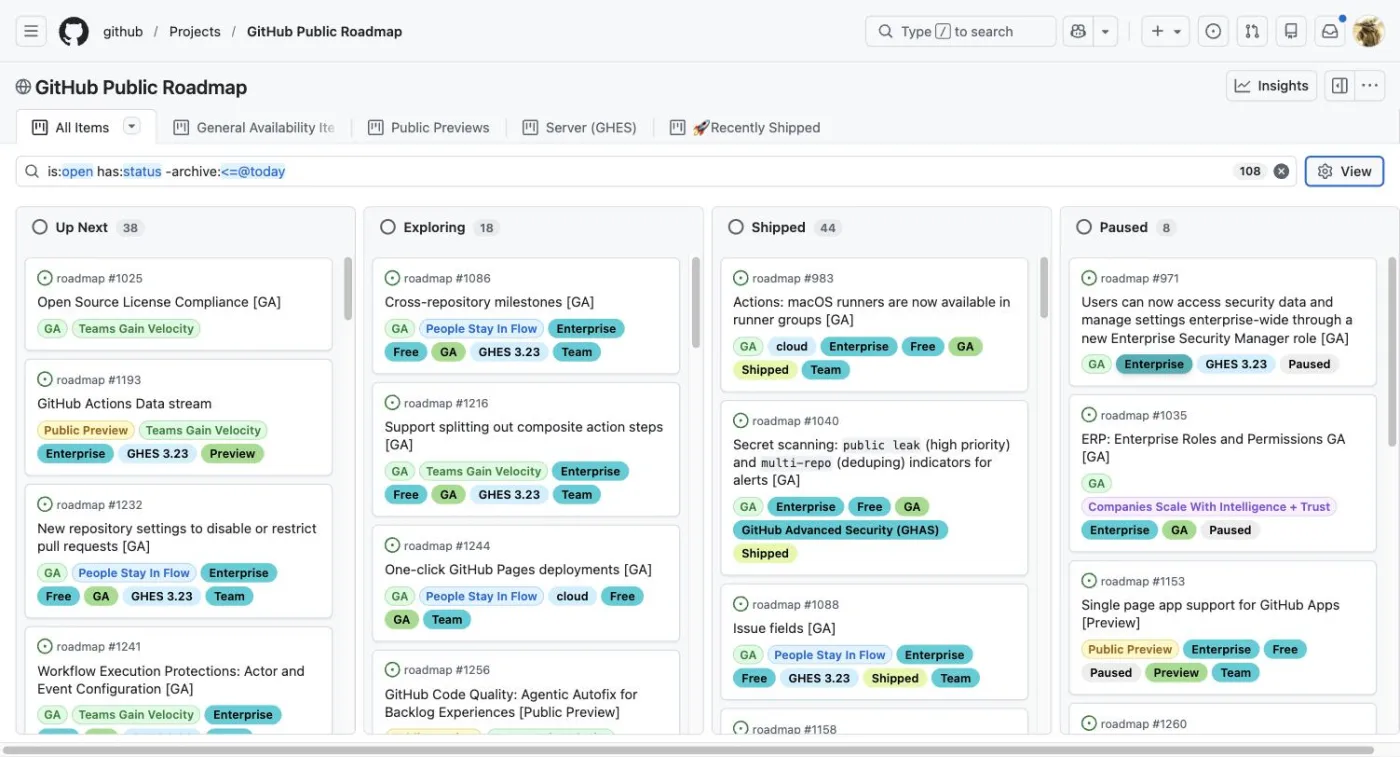
GitHub is a useful example because it shows that a roadmap can contain plenty of context without requiring lots of top-level columns.
The status tells you where something is. The card itself provides additional information about what the item relates to.
For a smaller SaaS, you probably don't need to reproduce that level of detail.
But the principle is useful: keep the roadmap structure simple and put additional context on the individual items.
2. Atlassian
Atlassian takes a more time-oriented approach.
Its cloud roadmap covers 19 products in one roadmap and organises work by quarter, from Q1 2024 through Q4 2026.
Users can filter it by category, status and app, and the page includes a "last updated" line.
Atlassian marks 31 items as Coming soon and 124 as Released.
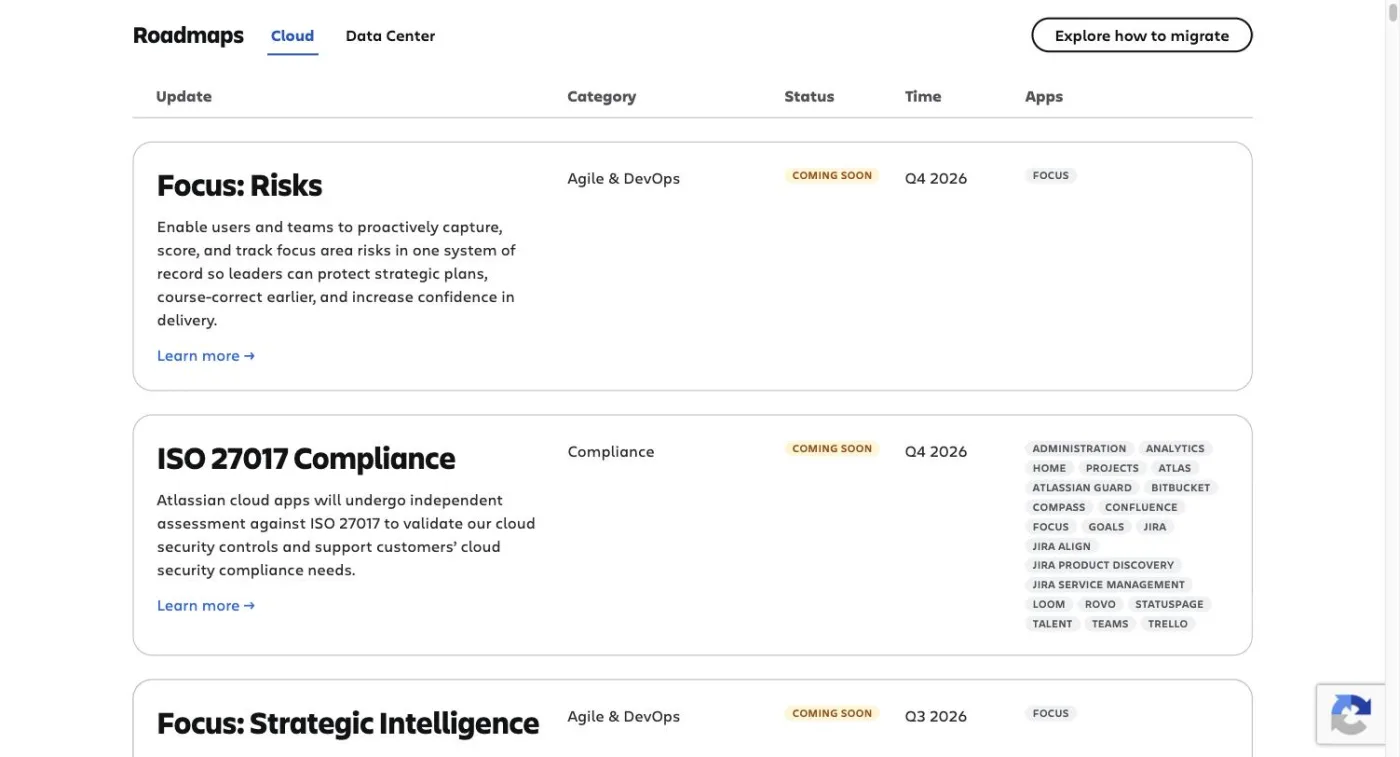
This is a good example of a roadmap where when something is expected to happen is more prominent than the development stage.
That can work particularly well when customers care about release timing.
It also illustrates that dates don't necessarily have to mean exact delivery dates.
Organising work by quarter gives customers useful information while avoiding the precision of a specific day.
For a smaller SaaS, quarters can be a useful middle ground if you want to communicate timing without committing to an exact release date.
3. Microsoft
Microsoft uses three stages:
In development → Rolling out → Launched
Across 1,782 updates, its roadmap currently holds 704 items In development, 231 Rolling out and 840 Launched.
Preview is not a stage. It is a separate release phase printed on the card alongside a rollout date, so an item can sit in In development while already advertising a preview date and a later rollout date.
Microsoft calls its dates "estimated release dates" and explicitly states that roadmap information is subject to change.
It also states that information will be removed when a feature or product becomes generally available, or is cancelled or postponed.
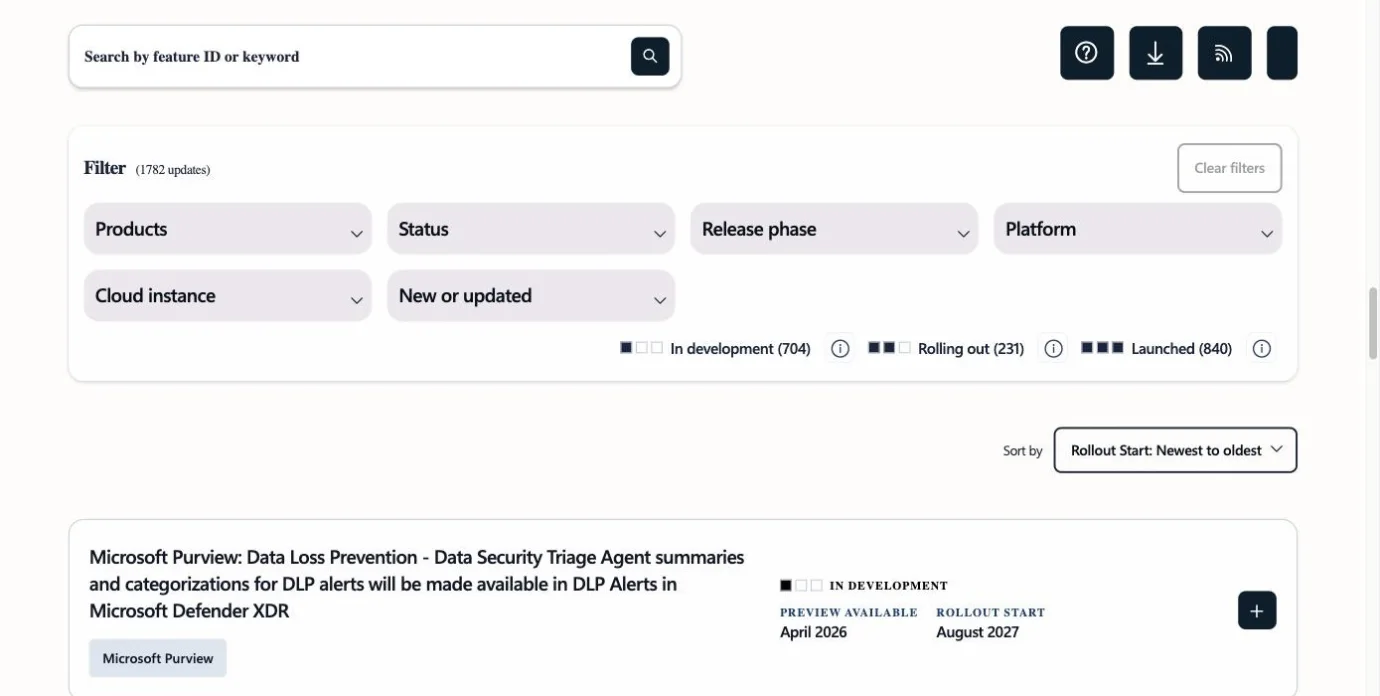
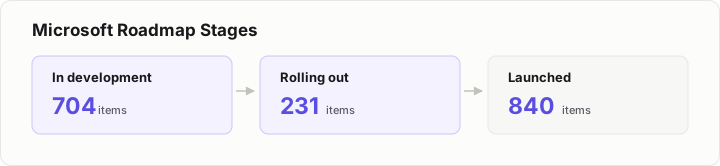
This makes Microsoft a useful example of combining status with timing.
A customer can understand both where an item is in the process and when it is expected to arrive.
For a small SaaS, you don't necessarily need even three. But the basic model is straightforward:
Where is it?
When do we expect it?
Those are two of the most useful questions a public roadmap can answer.
4. Buffer
Buffer's public roadmap uses five columns:
- Exploring
- Planned
- In Progress
- Beta
- Released
Every card also shows a vote count and posting date.
There are 100 items in Exploring, 42 in Planned, 14 in In Progress and 6 in Beta.
The extra two stages do real work. Beta tells customers a feature exists but is not finished, and Released keeps shipped work visible instead of deleting it.
Customer voting is particularly visible on the roadmap. Buffer's most-requested item, New Channel and Integration Requests, has 2,800 votes, while Support for rich text in posts has 185.
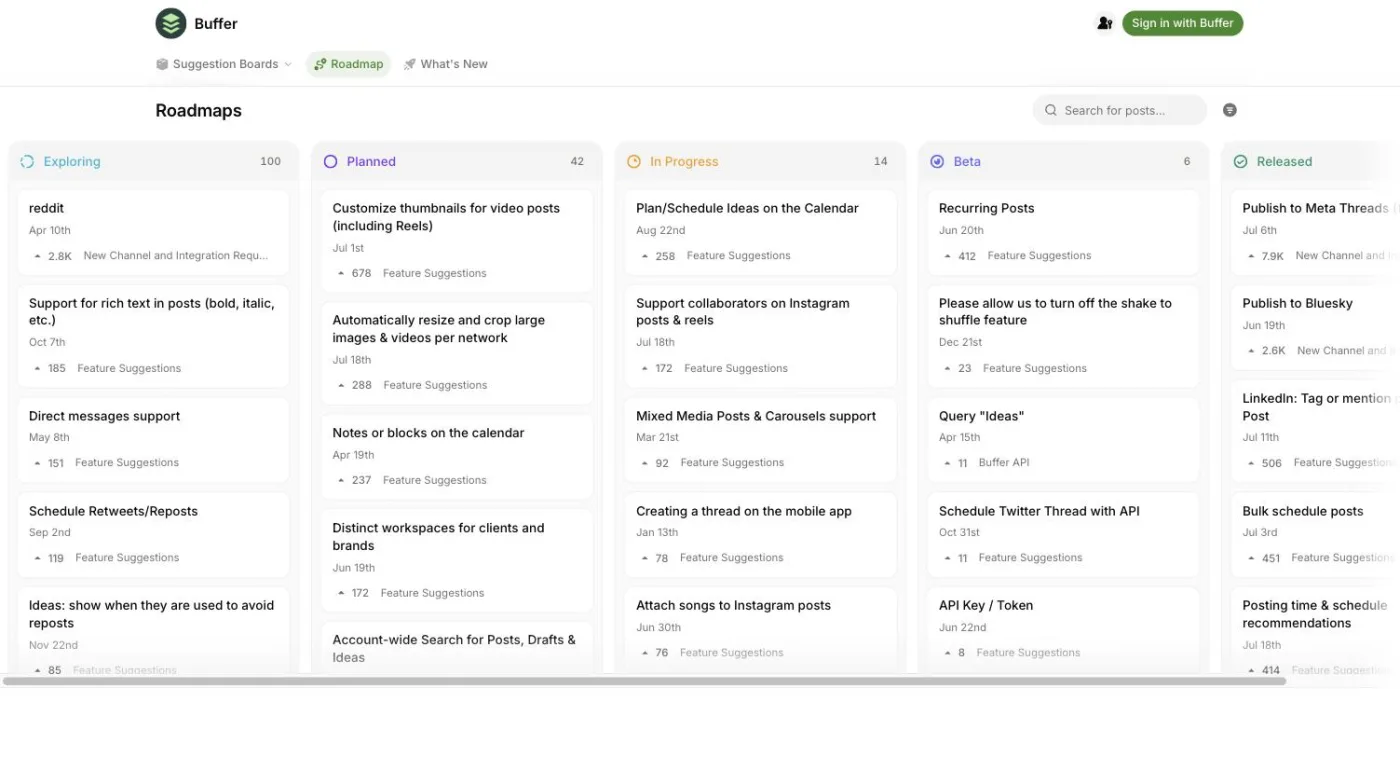
Buffer is a useful example of combining the roadmap with customer feedback.
The status tells the customer what the company is doing with an idea.
The votes show how much interest customers have expressed in it.
That doesn't mean votes have to determine your roadmap automatically. A feature with lots of votes does not necessarily have to become your next project.
But votes can provide a useful signal when deciding what deserves attention.
It is also worth noting that voting is a function of the tool powering the roadmap.
The roadmaps in this list that display votes use third-party feedback products. The in-house roadmaps from GitHub, Atlassian, Microsoft and Cal.com do not show vote counts.
5. Loom
Loom's public roadmap takes a different approach to organisation.
Its three tabs are:
- Coming soon
- Under consideration
- Launched
Rather than primarily organising everything by date, Loom groups items by product area, including areas such as Recording & Editing and Sharing & Collaboration.
Its most-requested item, Stitch Looms Together (Merge Videos), has 3,535 votes.
Interestingly, Loom shows vote counts even when an item has zero votes.
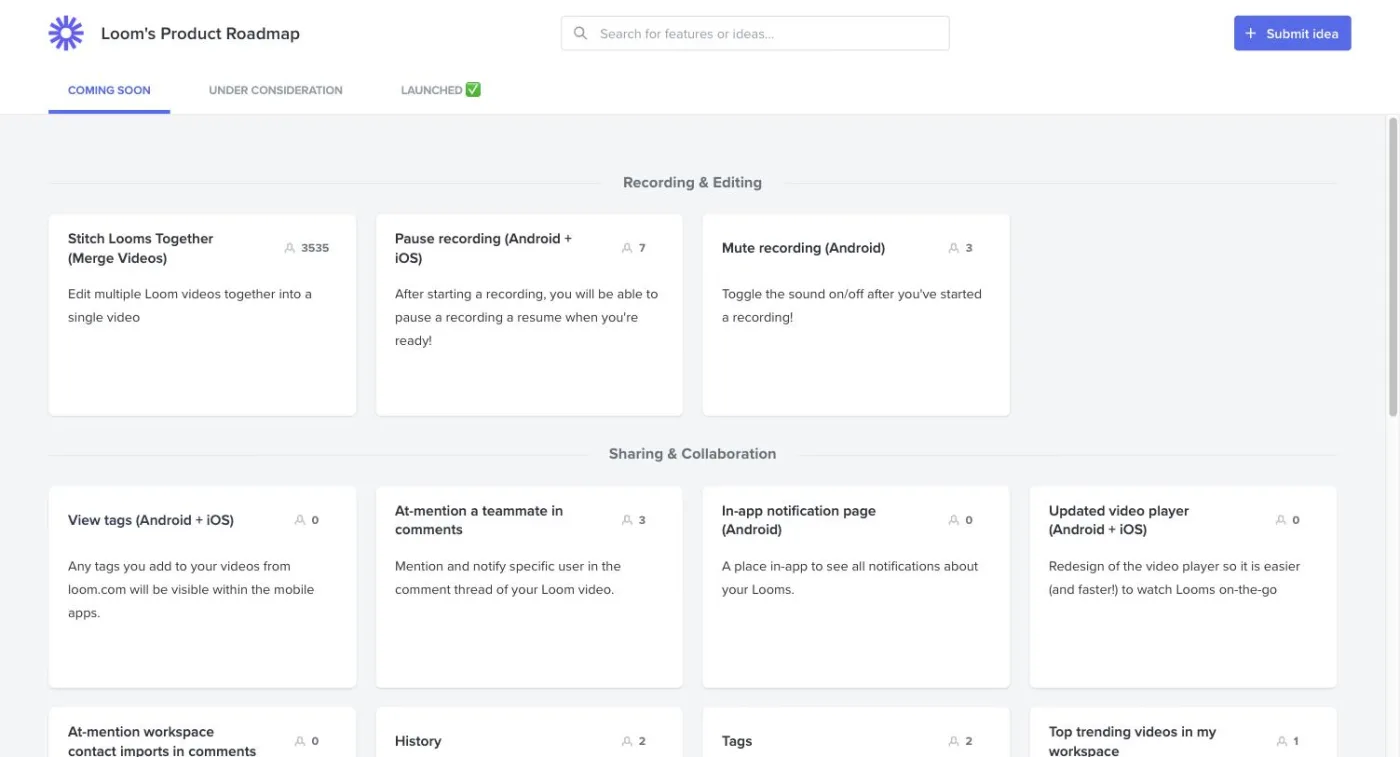
This is a useful reminder that a roadmap does not necessarily need to answer "when?" for every item.
Sometimes the more important question is simply:
What are you thinking about?
What is coming soon?
What has already launched?
For a SaaS with several distinct areas of functionality, grouping work by product area can also make the roadmap easier for customers to navigate.
Someone interested in one part of the product can focus on that area instead of searching through one large chronological list.
6. Ahrefs
Ahrefs separates its feedback system from its public roadmap.
Feedback is split across more than thirty boards, with each board representing a product area.
The public roadmap sitting on top of that system is much smaller.
Its three columns — Planned, In Progress and Complete — hold a few dozen items between them, and none of the columns publishes a count.
Meanwhile, the busiest single feedback board, Site Audit, contains 353 items on its own.
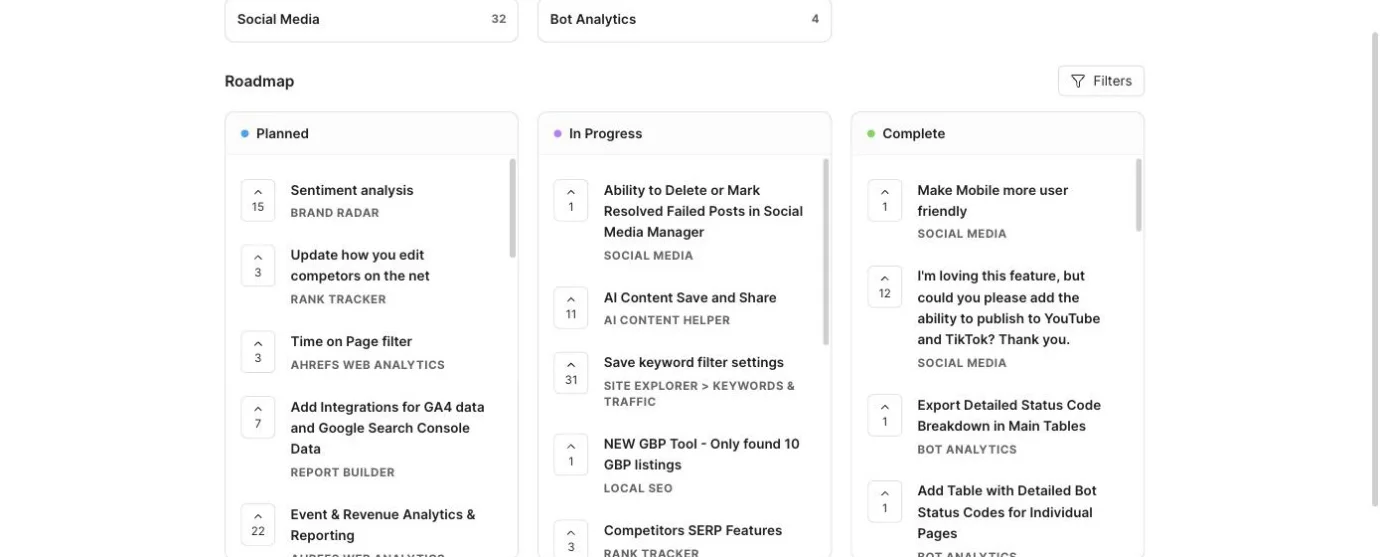
This demonstrates an important distinction:
Your feedback system does not have to be your roadmap.
Your feedback system can contain hundreds of customer requests.
Your roadmap can contain the much smaller selection of work that you actually want customers to see as part of your product direction.
That distinction becomes increasingly useful as your SaaS grows.
If every request automatically becomes a roadmap item, your roadmap can quickly turn into a catalogue of everything customers have ever asked for.
A feedback board can be broad.
A roadmap can be selective.
7. Featurebase
Featurebase uses four straightforward columns:
Planned → Next up → In Progress → Done
It currently has 131 items in Planned and 490 in Done.
Each card also includes a module tag as well as vote and comment counts.
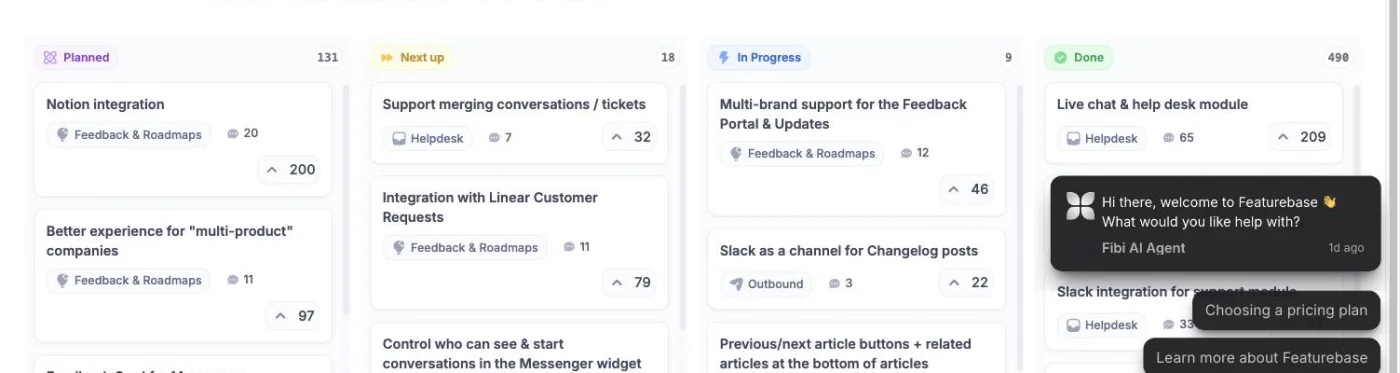
This is probably one of the clearest examples of a conventional SaaS public roadmap.
Each column answers a simple question.
Planned: Is this on the roadmap?
Next up: Is it approaching active development?
In Progress: Is somebody working on it?
Done: Has it shipped?
There is no need to explain a complicated internal process.
This also reinforces the point about keeping the number of statuses under control.
Four is enough.
In fact, four is the highest number used by any of the eight roadmaps in this article.
8. Cal.com
Cal.com takes a much more date-driven approach.
Its roadmap is published as GitHub milestones with hard due dates.
One milestone, v6.5, has a due date of 15 May 2026 and is marked overdue by three months at 0% complete.
Another, v6.4, has a due date of 15 April 2026 and is marked overdue by four months.
The v6.4 milestone has 8 of 56 issues closed, or 14% complete.
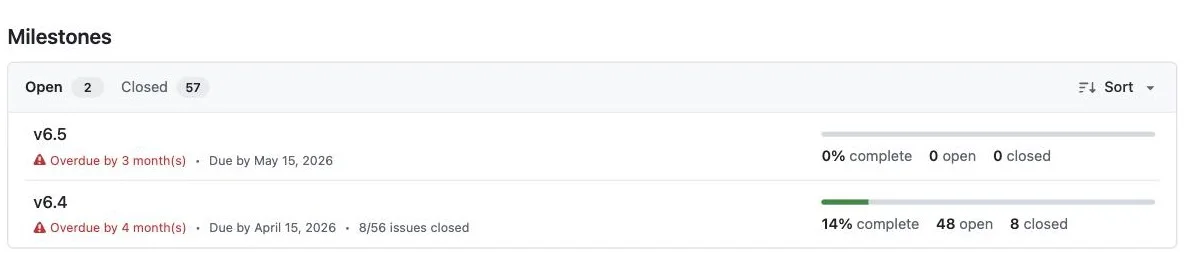
This is the clearest example in the list of the trade-off involved in publishing hard dates.
A specific date gives customers a very clear expectation.
But if the date slips, that expectation remains visible.
That doesn't make dates wrong.
It simply means that the more precise your roadmap becomes, the more commitment it communicates.
For a SaaS company that is comfortable publishing firm delivery dates, that can be useful.
For a small team whose priorities change regularly, broader time periods or status-based roadmaps may be more practical.
What Should the Columns on a Public Roadmap Be?
Looking across these examples, the answer is surprisingly simple.
Most of them settle on three or four, and you probably do not need more.
The most common patterns are variations of a few basic models.
Exploring → Planned → In Progress
This works well if you want to distinguish ideas you are still considering from work that has actually made it onto the roadmap.
Buffer starts here and then adds Beta and Released on the end.
Planned → In Progress → Done
This is the simplest possible development-oriented roadmap.
It tells customers what is planned, what is being worked on and what has shipped.
Planned → Next up → In Progress → Done
Featurebase uses this four-stage model.
The additional Next up stage creates a distinction between work that is planned generally and work that is approaching development.
Now → Next → Later
This is a more time-oriented approach.
Rather than exposing development stages, it communicates priority and approximate timing.
There is no reason your roadmap has to copy any of these exactly.
In fact, if your product needs a different structure, that is perfectly reasonable.
Nolby, for example, does not force every SaaS into a fixed set of statuses. Roadmap statuses are unlimited and can be named by the customer.
That means you can create the columns that make sense for your product rather than choosing between a handful of predetermined templates.
Should You Put Dates on a Public Roadmap?
This is probably the most difficult roadmap decision.
Dates give customers useful information.
But they also create expectations.
The examples in this article show several approaches.
Atlassian organises work by quarter.
Microsoft uses estimated release dates.
Cal.com publishes hard milestone due dates.
Other roadmaps focus primarily on status or product area.
There is also a customer-side argument for dates. A product manager discussing public roadmaps on r/ProductManagement reports that SaaS customers can interpret undated columns as a lack of commitment and may prefer quarters.
At the same time, the Cal.com example shows the other side of the equation.
Once a specific date is public, customers can see when that date passes.
So there is a spectrum:
No date → Quarter → Estimated date → Exact due date
The further right you go, the more information you provide — but the more commitment you communicate.
For many small SaaS companies, quarters can be a useful compromise.
They give customers some indication of timing without making the roadmap look like a guaranteed delivery schedule.
Should Your Roadmap Be Public or Private?
If you've decided to have a roadmap, there is another question: who should be able to see it?
A genuinely public roadmap is available without requiring visitors to sign in.
That can make sense when the roadmap is part of your product's public-facing presence.
Existing customers can see what you're building.
Prospective customers can understand your direction.
And nobody has to create another account just to read a roadmap.
You can also separate viewing the roadmap from participating in it.
For example, anyone might be able to view your roadmap while posting, voting or commenting is restricted to customers.
Or you can remove authentication requirements from those actions too.
Nolby takes the latter approach: customers never need an account to post or vote.
For a small SaaS, that keeps the feedback loop simple.
What Should Happen to Requests You Won't Build?
This is one area where the public roadmap examples are surprisingly consistent.
Only one of the eight comes close. GitHub keeps a Paused column, holding 8 items — but paused means work that has been stopped, not work that has been refused. None of the eight has a dedicated Won't build or Not planned column.
That is interesting because publicly communicating rejected requests is often recommended as part of a good feedback process.
But in practice, these examples do not put those decisions directly onto the public roadmap.
Microsoft's stated policy goes in the opposite direction: information is removed when a feature or product is cancelled or postponed.
So you don't necessarily need to turn your roadmap into a graveyard of rejected ideas.
A better approach can be to keep the roadmap focused on things that are being considered, planned, developed or shipped.
Your feedback system can contain the broader universe of requests.
That gives you somewhere to collect ideas without making a public promise that every request belongs on the roadmap.
Public Roadmap vs Changelog
A roadmap tells customers where the product is going.
A changelog tells them what has already changed — and there are good examples of those too.
They're related, but they're not the same thing.
A roadmap might contain:
Planned → In Progress → Done
Once an item reaches Done, you can then publish a changelog entry explaining what was released.
The roadmap answers:
What's coming?
The changelog answers:
What changed?
Keeping the two separate makes both more useful.
It also creates an opportunity to close the feedback loop.
If a customer voted for a feature and that feature eventually ships, they should ideally find out about it.
Nolby connects these two parts of the workflow. When you publish a changelog entry, everyone who voted for the posts it closes is emailed.
That means the customer's original feedback doesn't simply disappear into a completed column.
They can see that the request was acted on and receive an update when the resulting feature is released.
How to Set Up a Public SaaS Roadmap
You don't need a complicated product-development system to get started.
The examples above provide enough patterns to build a simple roadmap of your own.
1. Decide what customers need to know
Start with the information your customers actually care about.
Do they want to know:
- What's being considered?
- What's definitely planned?
- What's currently being built?
- What's coming next?
- What's already shipped?
- When something might arrive?
You don't necessarily need to answer every question.
Choose the information that makes your product direction easiest to understand.
2. Choose three or four statuses
Keep your public roadmap simpler than your internal workflow.
A good starting point might be:
Planned → In Progress → Done
Or:
Exploring → Planned → In Progress
Or:
Planned → Next up → In Progress → Done
If none of these quite fit your product, create your own.
The important thing is that each status has a clear meaning to someone outside your company.
3. Decide how much timing information to publish
Think carefully before adding exact dates.
If your product roadmap changes frequently, consider quarters or broader periods.
If dates are genuinely useful to your customers and you can maintain them, more precise estimates may make sense.
Just remember that a published date becomes part of the customer's expectation.
4. Keep feedback separate from the roadmap
Don't automatically put every feature request onto the roadmap.
Instead, use your feedback system as the larger collection of customer ideas.
The roadmap can then show the smaller set of work that has made it far enough through your product process to be publicly communicated.
This is one of the clearest lessons from the Ahrefs example.
5. Decide whether customers should vote
Voting can give you another signal when prioritising work.
Buffer and Loom both show how vote counts can sit directly on roadmap items.
But votes are feedback, not instructions.
Your roadmap should still reflect your product decisions.
6. Make participation easy
If customers have to jump through hoops before they can submit or vote on an idea, fewer people are likely to participate.
A public roadmap doesn't necessarily need a login just to interact with it.
Nolby lets customers post and vote without creating an account, reducing the friction between having an idea and adding it to the feedback system.
7. Connect completed work to your changelog
When something ships, move it into your completed status and publish a proper release update.
If your roadmap and feedback system are connected, you can also notify customers who originally requested or voted for the feature.
That's where a public roadmap becomes part of a feedback loop rather than simply being a static list.
A Simple Public Roadmap Template
If you want a straightforward place to start, try:
Exploring
Ideas you are considering but have not committed to building.
Planned
Work that has made it onto the roadmap.
In Progress
Work currently being developed.
Done
Features and improvements that have shipped.
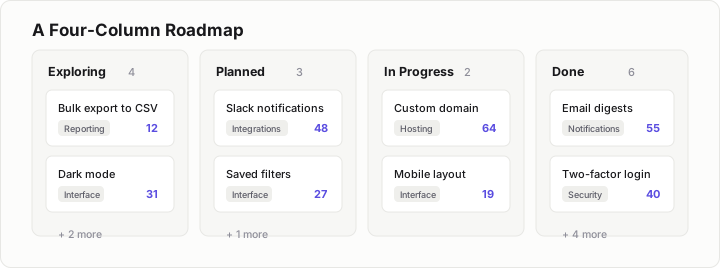
You can add votes, comments, product-area tags and dates to the individual cards if those things are useful to your customers.
Or keep it even simpler:
Planned → In Progress → Done
The right roadmap is not the one with the most information.
It is the one that makes your product direction easiest for customers to understand.
Build Your Public Roadmap with Nolby
Once you've looked at examples from GitHub, Atlassian, Microsoft, Buffer, Loom, Ahrefs, Featurebase and Cal.com, the patterns are fairly clear.
You don't need a complicated roadmap.
You need a place where customers can see what you're considering, what's being built and what you've shipped — and ideally a way for them to influence that direction.
That's what Nolby is built for.
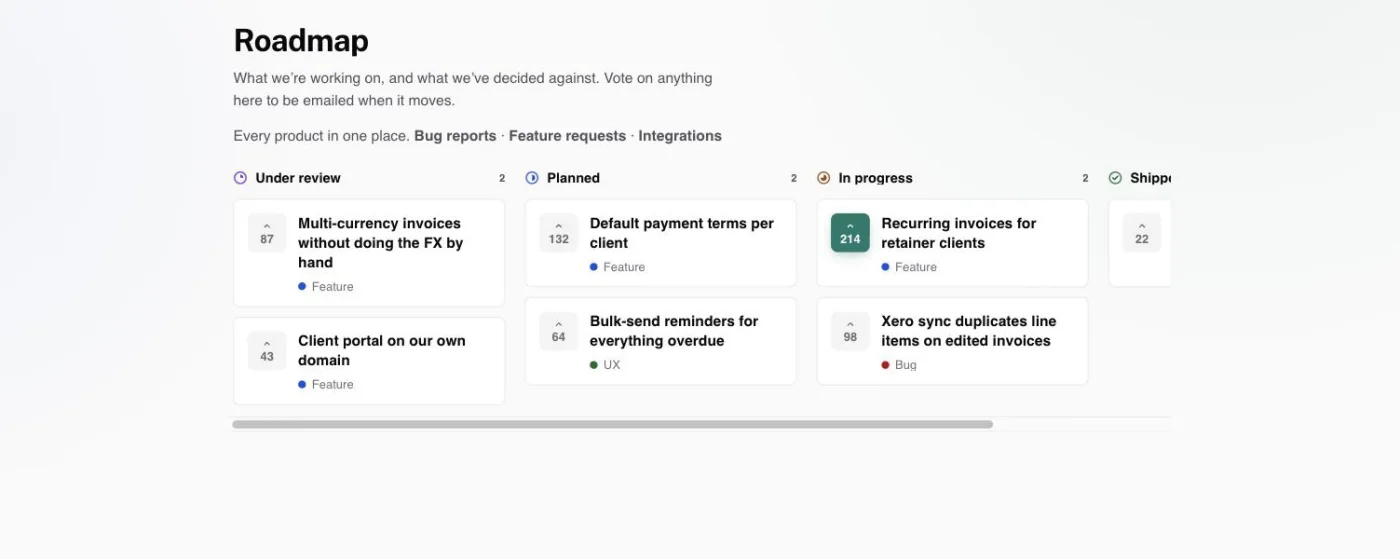
With Nolby, you can create a public roadmap around your own product, use unlimited custom roadmap statuses, collect customer feedback, let customers vote and comment, and connect completed requests to your changelog.
You also don't have to force customers through an account-creation process just to participate. Customers can post and vote without an account.
And because each board represents a product, you can give each product its own roadmap rather than trying to squeeze everything into one giant board.
Nolby also publishes its own roadmap on Nolby, so you can see the same approach in practice.
If you're a small SaaS looking for a straightforward way to combine customer feedback, voting, public roadmaps and changelogs, Nolby gives you all of those pieces in one place.
The Free plan gives you one board with a public roadmap and changelog, unlimited posts, votes, comments and voters.
If you need multiple boards, teammates, a custom domain or private boards, Pro is $39/month.
Start with the Free plan, create your first public roadmap, and give your customers somewhere to see — and influence — what you're building.
Public Roadmap FAQs
What exactly is a public product roadmap?
A public product roadmap is a customer-facing view of the work a SaaS company is considering, planning, developing or has completed. It gives customers visibility into product direction without exposing the entire internal development process. Roadmaps commonly use status columns, dates, product areas, votes or comments to communicate what is happening.
What statuses should a public roadmap use?
Start with three or four statuses. Common structures include Exploring, Planned and In Progress, or Planned, Next up, In Progress and Done. The eight examples covered here use between two and five status columns. A public roadmap generally does not need to expose every internal development stage.
Should a public roadmap have dates on it?
Dates are optional. Some SaaS roadmaps use quarters or estimated release dates, while others organise work by status or product area. Dates provide more information but also create stronger expectations. If exact delivery dates are difficult to maintain, broad periods such as quarters can provide useful timing information without creating the same level of commitment.
Should a public roadmap be open to everyone or only to logged-in customers?
A public roadmap can be available to everyone so prospective and existing customers can see your product direction without creating an account. Viewing the roadmap can also be separated from participating in it. Depending on your setup, customers can post, vote and comment with or without authentication.
What is the difference between a public roadmap and a changelog?
A public roadmap communicates what you are considering, planning or developing. A changelog records what you have released. They work well together: the roadmap shows where an item is going, while the changelog explains what changed after it ships. Keeping them separate makes both easier for customers to understand.
How often should a public roadmap be updated?
Update your public roadmap whenever the status of an item meaningfully changes or information such as its expected timing changes. There is no universal update schedule. The important thing is to keep the information useful and understandable. Avoid exposing internal details that create maintenance work without adding meaningful information for customers.
Final Takeaway
The best SaaS public roadmap examples aren't necessarily the most complicated ones.
GitHub adds useful context to its roadmap cards. Atlassian uses quarters. Microsoft combines status with estimated dates. Buffer and Loom incorporate voting. Ahrefs separates its large feedback system from its smaller roadmap. Featurebase keeps its stages simple. Cal.com demonstrates the trade-off that comes with publishing hard dates.
But across all eight, the basic roadmap structure remains remarkably restrained.
Three or four statuses is enough.
The bigger decisions are what those statuses mean, how much timing information you're prepared to publish, and how you want to connect your roadmap to customer feedback.
For a small SaaS, a simple public roadmap with customer feedback, voting and a connected changelog can provide a much clearer feedback loop than an internal backlog alone.
And you don't need to build that system from scratch.
Nolby gives you the roadmap, feedback board, voting, comments and changelog in one place — with custom statuses and no account required for customers to post or vote.
If you're ready to publish your SaaS roadmap, start with Nolby's free plan and put your first roadmap in front of your customers.