LaunchNotes Alternative: Is nolby a Better Fit?
Comparing LaunchNotes and nolby? See pricing, features, trade-offs and what moving your changelog, roadmap and subscribers involves.
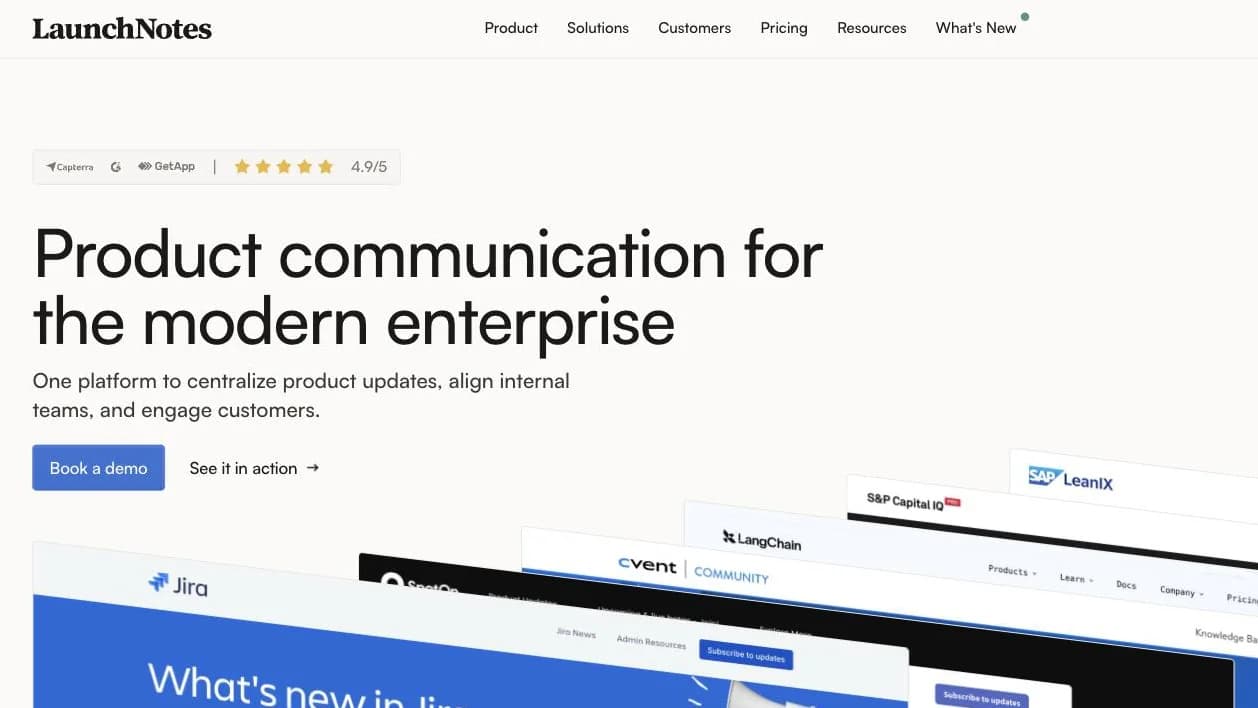
LaunchNotes is a product communication platform for announcements, feedback and roadmaps. It is well reviewed and has a broad feature set, including security and administration features for larger organisations.
But if your small SaaS team mainly needs a public roadmap, changelog and a way to tell customers when requested features ship, the price and sales-led trial may feel excessive. nolby offers a free plan and links feedback to changelog updates.
What is LaunchNotes good at?
LaunchNotes describes itself as “product communication for the modern enterprise”. It is not just a place to publish release notes. It covers feedback, idea voting and roadmaps as well as product announcements.
That scope suits teams coordinating communication across products and audiences. Growth includes a product page, custom domain and monthly email allowance. Premium can add pages, users, advanced segmentation and full white-labelling. LaunchNotes also offers SAML, audit logs, SOC 2, Type II, AI drafting and email open and click tracking.
Its rating on G2 is 4.9/5 across 33 reviews. Most of those reviewers are from small businesses: 19 work at organisations with 50 or fewer employees. LaunchNotes is not a bad product just because its pricing will not suit every small team.
Why look for a LaunchNotes alternative?
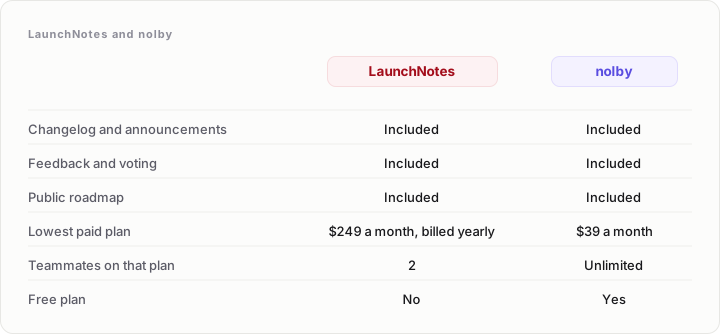
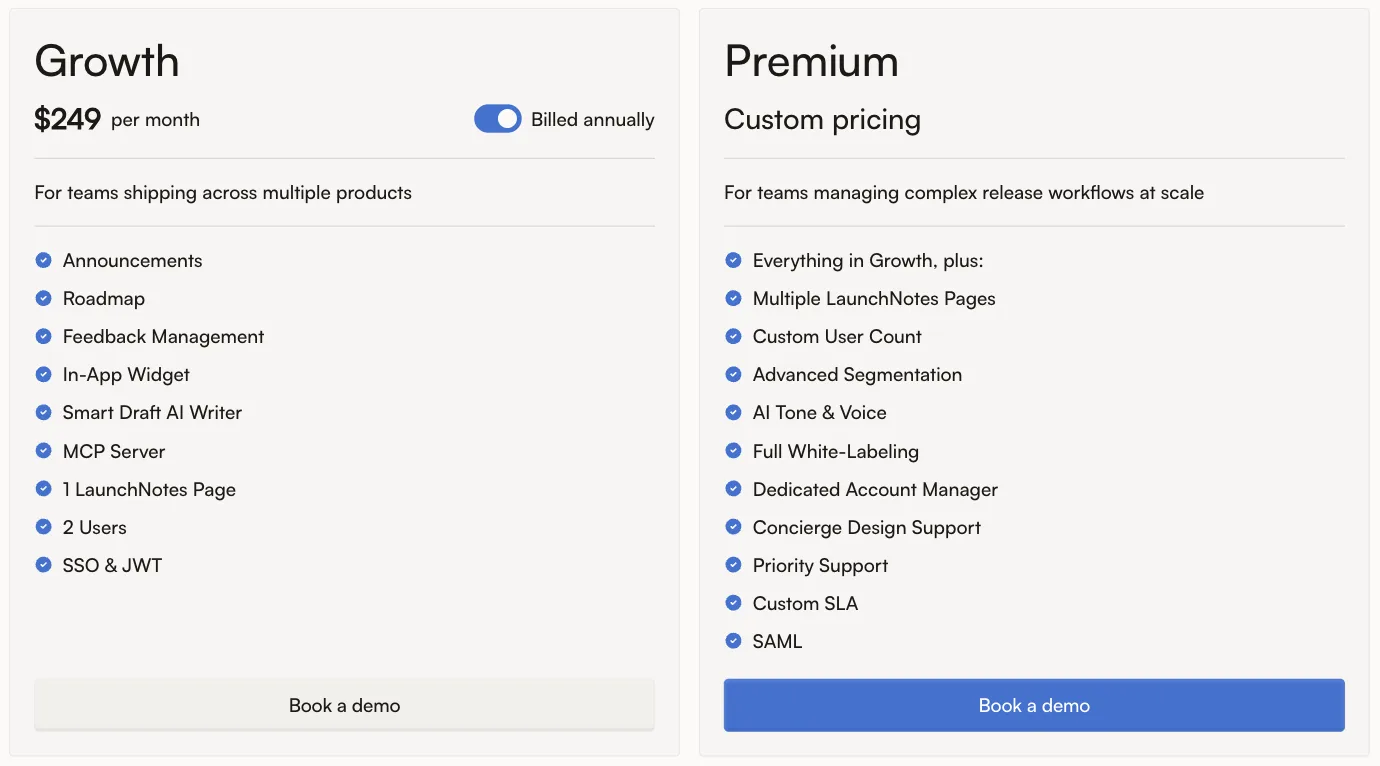
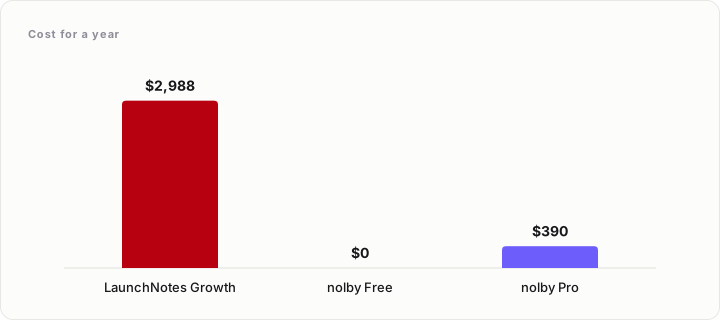
The most obvious reason is cost. Growth starts at $249 per month, billed annually: $2,988 for a year.
There is no free plan. To get a 14-day trial, you must first book a 30-minute demo, then wait for the LaunchNotes team to set it up. That may suit a larger company evaluating a platform, but adds friction for a founder who wants to try a tool straight away.
Some G2 reviewers have raised concerns about the price and packaging. One small-business reviewer called it “10x the price” and said LaunchNotes was “leaving behind all the SMBs”. Another noticed the move from monthly to annual billing. These are individual views. Read LaunchNotes reviews on G2.
Another reason is that a team may not need the whole feature set. If you mainly publish updates and maintain a public roadmap, AI drafting, advanced segmentation, SAML and audit logs may not justify the cost.
LaunchNotes pricing vs nolby pricing
LaunchNotes Growth costs $249 per month, billed annually, or $2,988 for the year. It includes two users, one page, one custom domain and 5,000 emails per month. Premium has custom pricing and adds options such as multiple pages, more users, advanced segmentation, full white-labelling, SAML and audit logs.
- nolby Free — $0. Includes one board, one admin, unlimited voters, a public roadmap, a changelog with email subscribers and scheduled publishing.
- nolby Pro — $39 per month, or $390 for a year when billed annually. Includes unlimited boards and teammates, a custom domain, private boards and Slack.
- nolby Brand — $99 per month. Adds a removable “Powered by nolby” badge, single sign-on for your own customers and signed webhooks.
For a small team, the price difference is substantial: LaunchNotes Growth costs 7.7 times as much as nolby Pro over a year, a difference of $2,598.
LaunchNotes vs nolby: feature comparison
| Feature | LaunchNotes | nolby |
|---|---|---|
| Public changelog | Yes | Yes |
| Roadmap | Yes | Yes |
| Feedback and idea voting | Yes | Yes |
| Free plan | No | Yes |
| Trial | 14-day trial, arranged after a demo | Free plan available |
| Entry-level paid pricing | $249/month, billed annually | $39/month, or $390/year on Pro |
| AI drafting | Yes | No |
| Email open and click tracking | Yes | No |
| Advanced segmentation | Available on Premium | No |
| SAML | Available on Premium | No |
| Audit logs | Available on Premium | No |
| SOC 2, Type II | Yes | Not offered |
| Separate product boards with their own changelogs and subscribe buttons | Multiple pages are available on Premium | Included through boards |
| Notify people who voted when a requested feature ships | Roadmaps notify customers when an item ships | Publishing an entry emails voters whose feedback posts it closes |
| Subscriber list import | Exports the subscriber list as CSV | No import; subscribers confirm their own addresses |
| Slack | Yes | Included on Pro |
| Public API | Yes | Not available |
The trade-off is straightforward: LaunchNotes offers more enterprise-ready features; nolby focuses on feedback, roadmaps and changelogs, with a free way to start.
How nolby handles product updates and feedback
In nolby, each board represents a product, with its own roadmap, changelog, subscribe button and embed. Customers can follow the product they use without receiving every announcement your company makes.
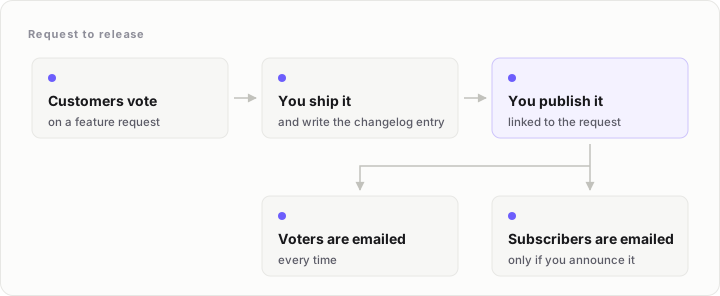
When you publish a changelog entry, nolby updates the status of the feedback posts it closes and emails everyone who voted for them. If you choose to announce the entry, it also goes to changelog subscribers, and a dot appears on the in-app widget until a visitor reads it.
nolby integrates with Slack, and signed webhooks can reach Zapier, Make and n8n. It has no two-way sync with Jira, Linear or GitHub and no public API, so check these limits if they affect your workflow.
What you give up by moving to nolby
nolby does not offer AI drafting, email open or click tracking, advanced segmentation, SAML, audit logs or SOC 2, Type II. It also cannot import subscribers.
LaunchNotes can export a project’s subscriber list as a CSV, but nolby cannot import it. Each subscriber must sign up and confirm their address with a six-digit code. That means rebuilding your email list rather than transferring it intact. If you need to preserve the existing list without asking people to subscribe again, this is a serious drawback.
nolby also has no customers yet, so there is no logo wall or case study to review. For enterprise security requirements or detailed email engagement reporting, LaunchNotes is stronger.
Who should stay on LaunchNotes?
Stay with LaunchNotes if you rely on AI drafting, email open and click tracking, advanced segmentation, SAML, audit logs or SOC 2, Type II. These features can matter when buyers have procurement requirements or your team needs formal controls.
It may also suit you if you use its broader feedback and roadmap features or need to manage several audiences.
Who should move to nolby?
Consider nolby if you want a public roadmap, changelog and feedback board without LaunchNotes’ annual price. The free plan is a starting point; Pro adds unlimited boards and teammates, private boards, a custom domain and Slack.
It is particularly useful if each product needs its own updates and you want to notify feature requesters when something ships.
Frequently asked questions
How much does LaunchNotes cost?
LaunchNotes Growth starts at $249 per month, billed annually. That is $2,988 for a year and includes two users, one page, one custom domain and 5,000 emails per month. Premium has custom pricing and offers more users and pages, an own email provider, advanced segmentation, full white-labelling, SAML and audit logs. See LaunchNotes pricing.
Does LaunchNotes have a free plan or a free trial?
LaunchNotes does not have a free plan. It offers a 14-day trial, but it is not self-serve: you first book a 30-minute demo, and the LaunchNotes team sets up the trial afterwards. If you want to try a tool without arranging a sales demo, nolby has a free plan with a public roadmap and changelog.
Can I move my LaunchNotes subscribers to another tool?
LaunchNotes can export a project’s subscriber list as a CSV. However, nolby cannot import that list. People who want to receive nolby changelog emails must subscribe themselves and confirm their address using a six-digit code. Moving to nolby therefore means rebuilding your subscriber list, rather than transferring it intact.
Does LaunchNotes have a roadmap and a feedback board?
Yes. LaunchNotes covers roadmaps, feedback and idea voting as well as product announcements and changelogs. It is not limited to release notes. nolby also combines feedback, roadmaps and changelogs, with each board representing a product and having its own roadmap, changelog, subscribe button and embed.
Can I tell the customers who asked for a feature that it shipped?
Yes, with nolby. When you publish a changelog entry, nolby moves the feedback posts it closes to a status and emails everyone who voted for them. If you announce the entry, it also goes to changelog subscribers and shows a dot on the in-app widget. That helps close the loop with customers who asked for the feature.